
Migrating from v3? View the migration guide.
Present a Paywall
Install the Helium SDK
Helium requires a minimum deployment target of iOS 15 and Xcode 14+. (Using the latest Xcode is recommended.)
- Swift Package Manager (SPM)
- Cocoapod
- In Xcode, navigate to your project’s Package Dependencies:
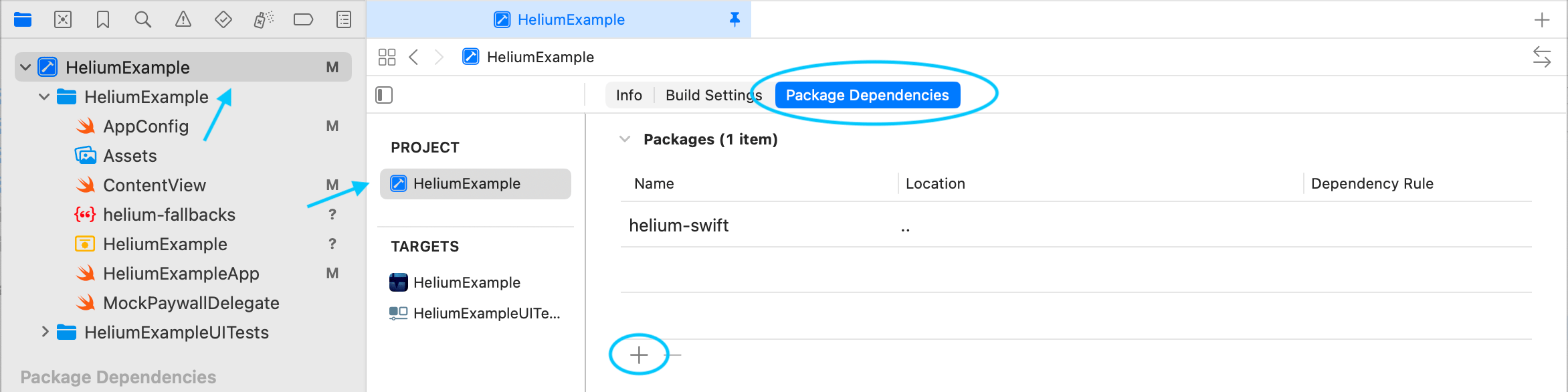
- Click the + button and search for the Helium package URL:
- Click Add Package.
- In the dialog that appears, make sure to add the Helium product to your app’s main target:
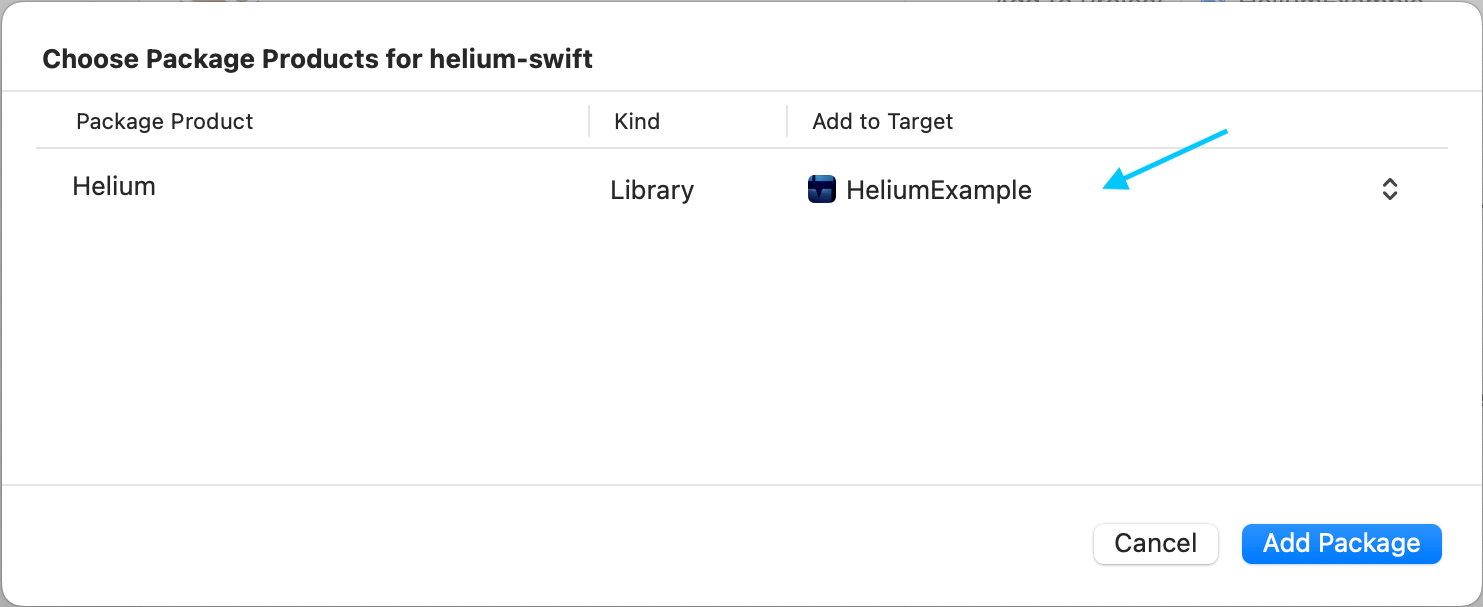
- Select Add Package in the dialog and Helium should now be ready for import.
Initialize Helium
Initialize the Helium SDK as early as possible in your app’s lifecycle.- SwiftUI
- SceneDelegate
- AppDelegate
Show Your First Paywall 🎉
CallpresentPaywall wherever you want to show a full-screen paywall:
Looking for alternative presentation methods? Check out the guide on Ways to Show a Paywall.
Recommended Setup
Here are some common additional steps that you may want to consider.Identifying Users
Identifying users is optional but can help with targeting and when forwarding events to external analytics platforms. If you are not sure, you probably do not need to identify your users. Set a custom user IDappAccountToken
appAccountToken
If you use an
appAccountToken for your existing purchases, then we recommend you also share this value with Helium so Helium can apply the appAccountToken to paywall purchases.Helium Events
Helium dispatches various events during paywall presentation and purchase flow. You can optionally handle these events in your mobile app. You can also configure Helium to forward them to your existing analytics provider.PaywallEventHandlers
When displaying a paywall you can pass in event handlers to listen for select events:Global Helium Event Listener
You can also add one or more global event listeners. For example:Fallback Paywalls
It is highly recommended that you set up “fallbacks” to handle the rare case when a paywall fails to display. Please follow this guide to do so.Checking Subscription Status & Entitlements
Helium checks entitlements directly through StoreKit and provides helper methods to make this easier. Consider checking entitlements to gate premium features.If you have a backend server that manages user entitlements, you may have no use for these helpers.
List of All Entitlement Helper Methods
List of All Entitlement Helper Methods
Accessed from
Helium.entitlements:hasAny() Checks if the user has purchased any subscription or non-consumable product.hasAnyActiveSubscription() Checks if the user has any active subscription.hasEntitlementForPaywall(trigger: String, considerAssociatedSubscriptions: Bool = false) Checks if the user has entitlements for any product in a specific paywall. Returns nil if paywall configuration hasn’t been downloaded yet.hasActiveEntitlementFor(productId: String) Checks if the user has entitlement to a specific product.hasActiveSubscriptionFor(productId: String) Checks if the user has an active subscription for a specific product.hasActiveSubscriptionFor(subscriptionGroupID: String) Checks if the user has an active subscription in a specific subscription group.purchasedProductIds() Retrieves a list of all product IDs the user currently has access to.activeSubscriptions() Returns detailed information about all active auto-renewing subscriptions.subscriptionStatusFor(productId: String) Gets detailed subscription status for a specific product, including state information like subscribed, expired, or in grace period.subscriptionStatusFor(subscriptionGroupID: String) Gets detailed subscription status for a specific subscription group.For paywalls that are user-initiated (e.g. “Upgrade to Premium”) and onboarding paywalls, checking entitled status is not recommended. Apps usually want to consistently show a paywall for these locations, and users can still “Restore Purchases” as needed.
Advanced
RevenueCat
By default, Helium will handle purchases for you! This section is typically for users who already use RevenueCat in their app.
Install HeliumRevenueCat
- Swift Package Manager (SPM)
- Cocoapod
- In Xcode, navigate to your project’s Package Dependencies.
- Click the + button and search for the HeliumRevenueCat package URL:
- Add the HeliumRevenueCat product to your app’s main target.
Configure Helium to use RevenueCat for Purchases
Simply use Helium’s pre-builtRevenueCatDelegate to let RevenueCat handle paywall purchases.
RevenueCat appUserID
If you ever change the appUserID of a user, keep Helium in sync with:Custom Purchase Handling
By default, Helium will handle purchases for you! This section is for those who want to implement custom purchase logic.
HeliumPaywallDelegate is defined as follows:
Additional Features
For the full public API and detailed parameter documentation, see the inline docstrings in the SDK source. Import Helium in your project and use your IDE’s autocomplete or jump-to-definition to explore all available methods and types.
Checking Download Status
Checking Download Status
You can check the status of the paywall configuration download using the You can also simply check if paywalls have been successfully downloaded with
Helium.shared.getDownloadStatus() method. This method returns a value of type HeliumFetchedConfigStatus, which is defined as follows:Helium.shared.paywallsLoaded().Get Paywall Info By Trigger
Get Paywall Info By Trigger
Retrieve basic information about the paywall for a specific trigger with
Helium.shared.getPaywallInfo(trigger: String) which returns:Hiding Paywalls Programmatically
Hiding Paywalls Programmatically
You can programmatically hide paywalls using:
Reset Helium
Reset Helium
Reset Helium entirely so you can call initialize again, for example after changing user traits that can affect the paywalls a user might see via targeting.